generated from wessel/boilerplate


76 lines
2.0 KiB
Markdown
76 lines
2.0 KiB
Markdown
## Installation
|
|
|
|
### Prerequisites
|
|
|
|
- ROS2 Jazzy or newer installed ([ROS2 Installation Guide](https://docs.ros.org/en/jazzy/Installation.html))
|
|
- CMake (version 3.8+)
|
|
- Python 3.8+
|
|
- libtomlplusplus-dev
|
|
- libpqxx-dev
|
|
- Colcon build tool
|
|
- Docker compose
|
|
|
|
### Paho MQTT library
|
|
|
|
For this project the Paho MQTT library is needed, which can be built with the following commands:
|
|
|
|
```bash
|
|
git clone https://github.com/eclipse/paho.mqtt.cpp
|
|
cd paho.mqtt.cpp
|
|
git co v1.5.4
|
|
|
|
git submodule init
|
|
git submodule update
|
|
|
|
cmake -Bbuild -H. -DPAHO_WITH_MQTT_C=ON -DPAHO_BUILD_EXAMPLES=ON
|
|
sudo cmake --build build/ --target install
|
|
```
|
|
|
|
### Clone the Repository
|
|
|
|
```bash
|
|
git clone https://git.wessel.gg/inholland/ros2-assignments.git
|
|
cd ros2-assignments
|
|
```
|
|
|
|
### Build the Workspace
|
|
|
|
```bash
|
|
colcon build
|
|
```
|
|
Any parameters can be changed before building by editing the `imu_reader.launch.xml` in the launch folder
|
|
|
|
### Source the Workspace
|
|
|
|
```bash
|
|
source install/setup.bash
|
|
```
|
|
|
|
### Start the database
|
|
```bash
|
|
sudo docker-compose up
|
|
```
|
|
You can configure specific database settings in the `docker-compose.yaml` in the root folder or the `config.toml` file in the `src/` folder
|
|
|
|
### Start the IMU Reader program
|
|
```bash
|
|
# For Serial:
|
|
ros2 launch g2_2025_imu_reader_pkg serial.launch.xml
|
|
|
|
# For MQTT:
|
|
ros2 launch g2_2025_imu_reader_pkg mqtt.launch.xml
|
|
```
|
|
To change parameters when using the launch file it will need to be edited in the `src/g2_2025_imu_reader_pkg/launch` folder. All parameters are already added to this document and thus only the values will need to be changed
|
|
|
|
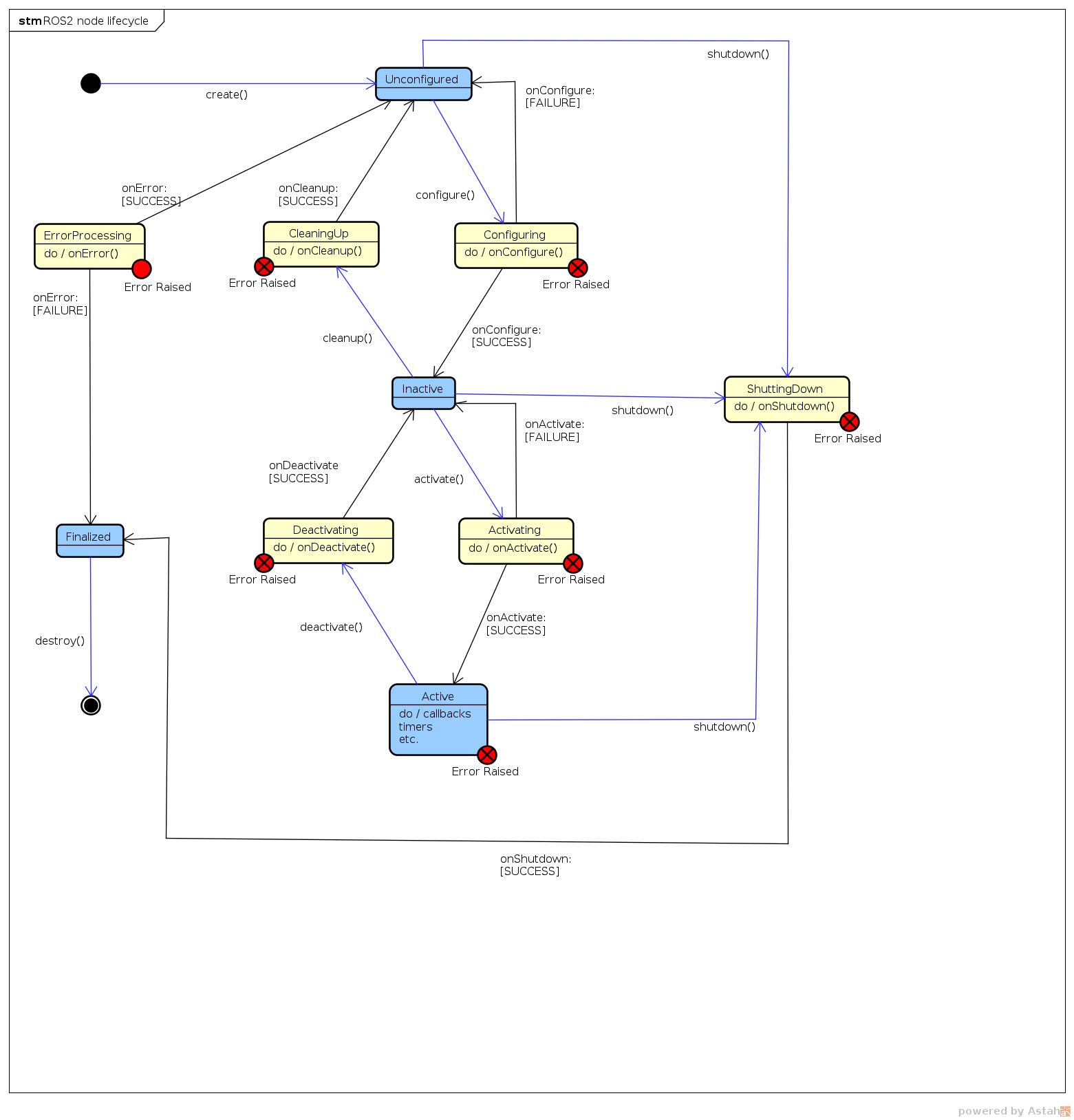
### Use the Lifecycle Node
|
|
|
|
To setup the lifecycle node the following commands can be used. They must be used in this order.
|
|
```bash
|
|
ros2 lifecycle set /LifecycleManager configure
|
|
ros2 lifecycle set /LifecycleManager cleanup
|
|
ros2 lifecycle set /LifecycleManager activate
|
|
ros2 lifecycle set /LifecycleManager deactivate
|
|
ros2 lifecycle set /LifecycleManager shutdown
|
|
```
|
|
|