generated from wessel/boilerplate


216 lines
8.4 KiB
Markdown
216 lines
8.4 KiB
Markdown
# LifecycleManager (`assignments::two::g2_2025_lifecycle_node`)
|
|
|
|
## Overview
|
|
The `LifecycleManager` is the core lifecycle-aware node responsible for managing the IMU reader system's operational states and hardware communication. It orchestrates transitions between configuration, activation, and deactivation phases, abstracting the complexity of dual communication backends (serial and MQTT) into a unified interface.
|
|
|
|
#### Implementation Details
|
|
|
|
**Parameters**
|
|
|
|
- **`device_path`** (string, default: "/dev/ttyUSB0"): Serial device path for hardware connection (e.g., USB serial adapter).
|
|
- **`baudrate`** (int, default: 115200): Serial communication baud rate in bits per second.
|
|
- **`comm_t`** (string, default: "serial"): Communication type selector—either "serial" or "mqtt" to determine which backend to use.
|
|
|
|
**Constructor**
|
|
```cpp
|
|
LifecycleManager()
|
|
```
|
|
- Initializes ROS2 lifecycle node with name `lifecycle_manager`
|
|
- Declares and reads configuration parameters: `device_path`, `baudrate`, and `comm_t`
|
|
- Creates a shared instance of `HardwareInterface` for managing all hardware operations
|
|
- Logs initialization status and readiness
|
|
|
|
**Core Functions**
|
|
|
|
**`CallbackReturn on_configure(const State&)`**
|
|
- Enters the *Unconfigured* → *Inactive* transition
|
|
- Checks the `comm_t` parameter to route initialization:
|
|
- **MQTT mode**: Calls `hw_interface->mqtt_configure()` to set up the MQTT client and broker connection
|
|
- **Serial mode**: Calls `hw_interface->open_device(device_path_, baudrate_)` to open and configure the serial port
|
|
- Returns `SUCCESS` if device initialization succeeds, `FAILURE` if serial/MQTT setup fails
|
|
- Logs configuration status and any errors
|
|
- Example test code (currently commented) demonstrates direct JSON parsing for validation
|
|
|
|
**`CallbackReturn on_activate(const State&)`**
|
|
- Enters the *Inactive* → *Active* transition
|
|
- Checks the `comm_t` parameter to start the appropriate reader:
|
|
- **MQTT mode**: Calls `hw_interface->mqtt_reader()` to attach MQTT callbacks and begin receiving messages
|
|
- **Serial mode**: Calls `hw_interface->start_read()` to spawn a background thread that continuously reads from the serial device
|
|
- Returns `SUCCESS` after reader startup
|
|
- Logs activation status and selected communication type
|
|
|
|
**`CallbackReturn on_deactivate(const State&)`**
|
|
- Enters the *Active* → *Inactive* transition
|
|
- Checks the `comm_t` parameter to cleanly stop operations:
|
|
- **MQTT mode**: Calls `hw_interface->close_mqtt_conn()` to disconnect from the broker and clean up resources
|
|
- **Serial mode**:
|
|
- Verifies device state with `hw_interface->is_device_open()`
|
|
- Calls `hw_interface->stop_read()` to signal the reader thread to exit and joins it
|
|
- Calls `hw_interface->close_device()` to release the serial port
|
|
- Returns `SUCCESS` after cleanup completes
|
|
- Logs deactivation and resource release
|
|
|
|
**`CallbackReturn on_shutdown(const State&)`**
|
|
- Enters the *Inactive* → *Finalized* transition
|
|
- Performs final shutdown logging
|
|
- Returns `SUCCESS`
|
|
|
|
**`CallbackReturn on_cleanup(const State&)`**
|
|
- Called during error recovery or explicit cleanup commands
|
|
- Performs resource cleanup and state logging
|
|
- Returns `SUCCESS`
|
|
|
|
|
|
## Communication Architecture
|
|
|
|
### Dual Backend Support
|
|
|
|
The `LifecycleManager` provides a flexible, pluggable communication architecture via the `comm_t` parameter:
|
|
|
|
#### Serial Communication Path
|
|
1. **Configuration Phase** (`on_configure`):
|
|
- Opens the serial device at the path specified by `device_path` and baudrate
|
|
- Validates device readiness
|
|
|
|
2. **Activation Phase** (`on_activate`):
|
|
- Spawns a background reader thread via `hw_interface->start_read()`
|
|
- Thread continuously polls the serial device with a timeout
|
|
- Reads are accumulated in a partial buffer, split on newline, and parsed as JSON
|
|
- Each valid JSON IMU payload is parsed into a `sensor_msgs::msg::Imu` and published to the ROS topic `imu/data`
|
|
|
|
3. **Deactivation Phase** (`on_deactivate`):
|
|
- Signals the reader thread to stop via atomic flag
|
|
- Joins the thread to ensure clean termination
|
|
- Closes the serial device
|
|
|
|
#### MQTT Communication Path
|
|
1. **Configuration Phase** (`on_configure`):
|
|
- Creates a persistent MQTT async client pointing to the broker at `SERVER_ADDRESS` (default: `tcp://localhost:1883`)
|
|
- Initializes MQTT callback infrastructure
|
|
|
|
2. **Activation Phase** (`on_activate`):
|
|
- Attaches MQTT callbacks to the client
|
|
- Subscribes to the topic specified by `TOPIC` (default: `esp32/imu`)
|
|
- The async client runs background threads to receive messages
|
|
|
|
3. **Deactivation Phase** (`on_deactivate`):
|
|
- Disconnects from the broker
|
|
- Cleans up MQTT client and callback resources
|
|
|
|
## Lifecycle Commands
|
|
|
|
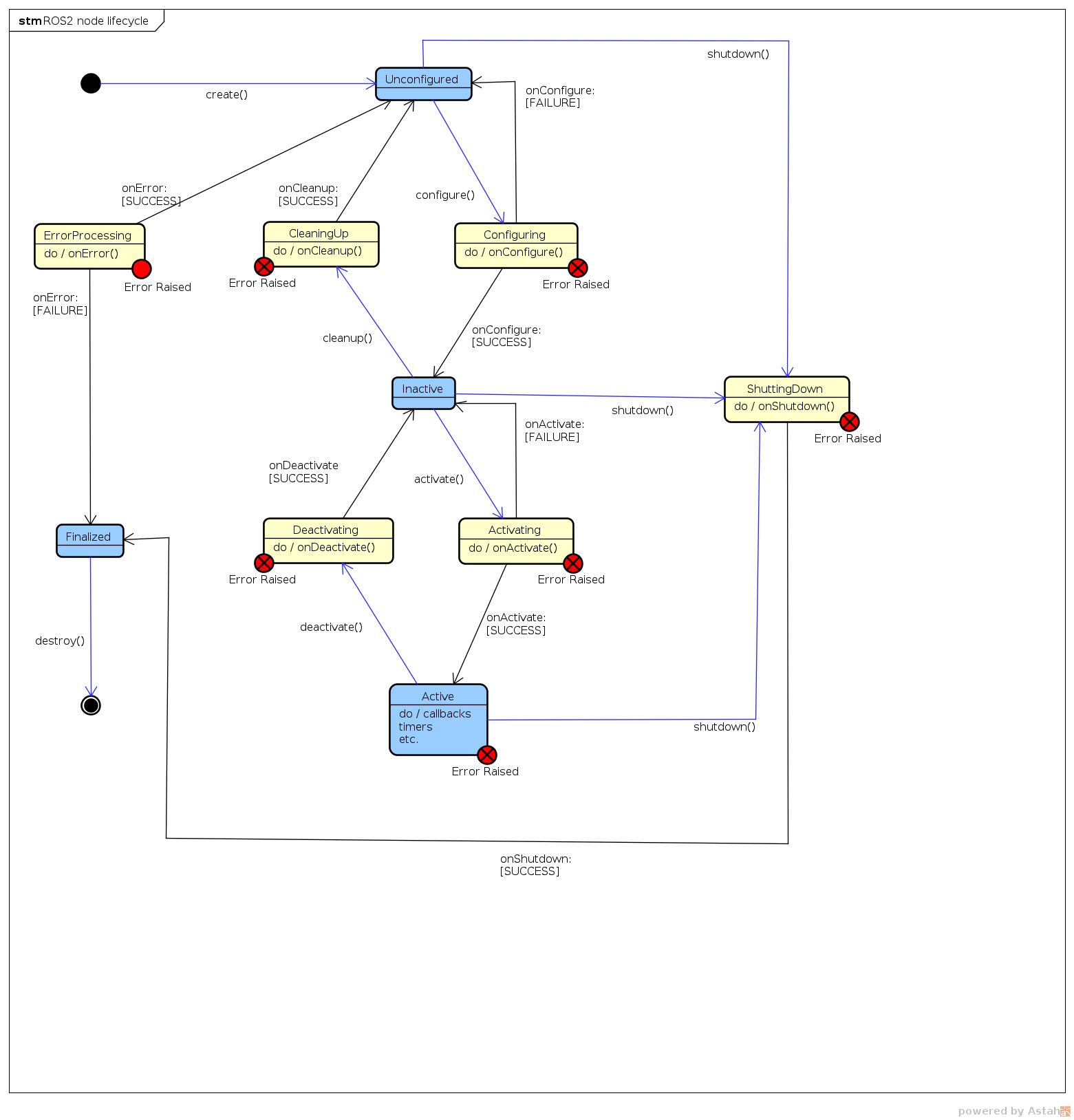
To interact with the `LifecycleManager` from the command line, use the following ROS2 lifecycle service calls:
|
|
|
|
```bash
|
|
# List current lifecycle state
|
|
ros2 lifecycle list /LifecycleManager
|
|
|
|
# Transition: UNCONFIGURED -> INACTIVE
|
|
ros2 lifecycle set /LifecycleManager configure
|
|
|
|
# Transition: INACTIVE -> UNCONFIGURED
|
|
ros2 lifecycle set /LifecycleManager cleanup
|
|
|
|
# Transition: INACTIVE -> ACTIVE
|
|
ros2 lifecycle set /LifecycleManager activate
|
|
|
|
# Transition: ACTIVE -> INACTIVE
|
|
ros2 lifecycle set /LifecycleManager deactivate
|
|
|
|
# Transition: INACTIVE -> FINALIZED
|
|
ros2 lifecycle set /LifecycleManager shutdown
|
|
```
|
|
|
|
|
|
## Data Flow
|
|
|
|
### Serial Data Flow
|
|
```
|
|
Hardware Device
|
|
↓
|
|
Serial Port (/dev/ttyUSB0)
|
|
↓
|
|
Background Reader Thread (start_read)
|
|
↓
|
|
Partial Buffer Accumulation
|
|
↓
|
|
JSON Line Extraction & Sanitization
|
|
↓
|
|
parse_data() ← Deserializes JSON to sensor_msgs::msg::Imu
|
|
↓
|
|
imu_publisher → ROS2 Topic (`imu_data`)
|
|
```
|
|
|
|
### MQTT Data Flow
|
|
```
|
|
MQTT Broker (localhost:1883)
|
|
↓
|
|
MQTT Async Client (Background Thread)
|
|
↓
|
|
Subscription to Topic (esp32/imu)
|
|
↓
|
|
MQTT Callback Handler
|
|
↓
|
|
parse_data() ← Deserializes JSON to sensor_msgs::msg::Imu
|
|
↓
|
|
imu_publisher → ROS2 Topic (`imu_data`)
|
|
```
|
|
|
|
## Error Handling
|
|
|
|
- **Serial Device Failures**: If `open_device()` fails during configuration, `on_configure()` returns `FAILURE` and the system remains in the `UNCONFIGURED` state
|
|
- **Communication Errors**: JSON parse errors from invalid payloads are caught and logged without crashing the node; the reader continues listening for the next message
|
|
- **Thread Safety**: The reader thread uses an atomic flag (`reading_`) for clean stop signaling and ensures all resources are properly joined before returning from `on_deactivate()`
|
|
|
|
## Design Patterns
|
|
|
|
1. **Strategy Pattern**: The `comm_t` parameter enables runtime selection of communication backend without changing node code
|
|
2. **Lifecycle Pattern**: Follows ROS2 managed node pattern for predictable initialization, startup, and shutdown sequences
|
|
3. **Thread Safety**: Atomic flags and resource cleanup ensure the reader thread can be safely started and stopped
|
|
4. **Buffer Accumulation**: Partial message buffering handles fragmented serial reads and ensures complete JSON objects are parsed
|
|
|
|
## Integration with HardwareInterface
|
|
|
|
The `LifecycleManager` delegates all hardware operations to the `HardwareInterface` class:
|
|
|
|
| Operation | Method | Lifecycle Phase |
|
|
|-----------|--------|-----------------|
|
|
| Open serial device | `open_device(path, baud)` | on_configure |
|
|
| Start reading | `start_read()` | on_activate |
|
|
| Stop reading | `stop_read()` | on_deactivate |
|
|
| Close serial device | `close_device()` | on_deactivate |
|
|
| Configure MQTT | `mqtt_configure()` | on_configure |
|
|
| Start MQTT reading | `mqtt_reader()` | on_activate |
|
|
| Close MQTT connection | `close_mqtt_conn()` | on_deactivate |
|
|
| Parse JSON payload | `parse_data(json_string)` | on_activate (continuous) |
|
|
| Publish IMU message | `publish_imu_data(imu_msg)` | on_activate (continuous) |
|
|
|
|
## Usage Example
|
|
|
|
```bash
|
|
# Launch the node with serial communication at /dev/ttyUSB0, 115200 baud
|
|
ros2 run g2_2025_imu_reader_pkg g2_2025_lifecycle_node \
|
|
--ros-args \
|
|
-p device_path:=/dev/ttyUSB0 \
|
|
-p baudrate:=115200 \
|
|
-p comm_t:=serial
|
|
|
|
# Alternatively, launch with MQTT communication
|
|
ros2 run g2_2025_imu_reader_pkg g2_2025_lifecycle_node \
|
|
--ros-args \
|
|
-p comm_t:=mqtt
|
|
|
|
# In another terminal, configure and activate the lifecycle
|
|
ros2 lifecycle set /LifecycleManager configure
|
|
ros2 lifecycle set /LifecycleManager activate
|
|
|
|
# Subscribe to published IMU data
|
|
ros2 topic echo /imu_data
|
|
|
|
# Deactivate and shutdown
|
|
ros2 lifecycle set /LifecycleManager deactivate
|
|
ros2 lifecycle set /LifecycleManager shutdown
|
|
```
|
|
|
|
---
|